AI UGC-style video ads
Turn your product pitch into an AI video ad.
Get help choosing an angle and writing the script, then see an AI avatar deliver it. SelfieAds brings the message, storyboard and clip revisions into one workspace, so you can shape the ad as you go.
Free trial: 1 avatar image + 1 complete ad. No card required.
720p, or a cheaper 360p, for each ad.
Standard renders the talking clips at 720p; Medium renders them at 360p for about a third of the cost. Your free ad is made at Medium. Check the export before using it in a campaign.
Example ads
Choose a format ↓Every new ad brings another round of work.
Before you have a video to review, someone has to turn the offer into a brief, write the script and get a first take made. If the opening misses the point or a line sounds wrong, there's another round of revisions to manage, alongside the campaigns or business you're already running.
SelfieAds keeps that work in one workspace. Get help developing the message, review an avatar's delivery and change the clips that need attention.
How it works
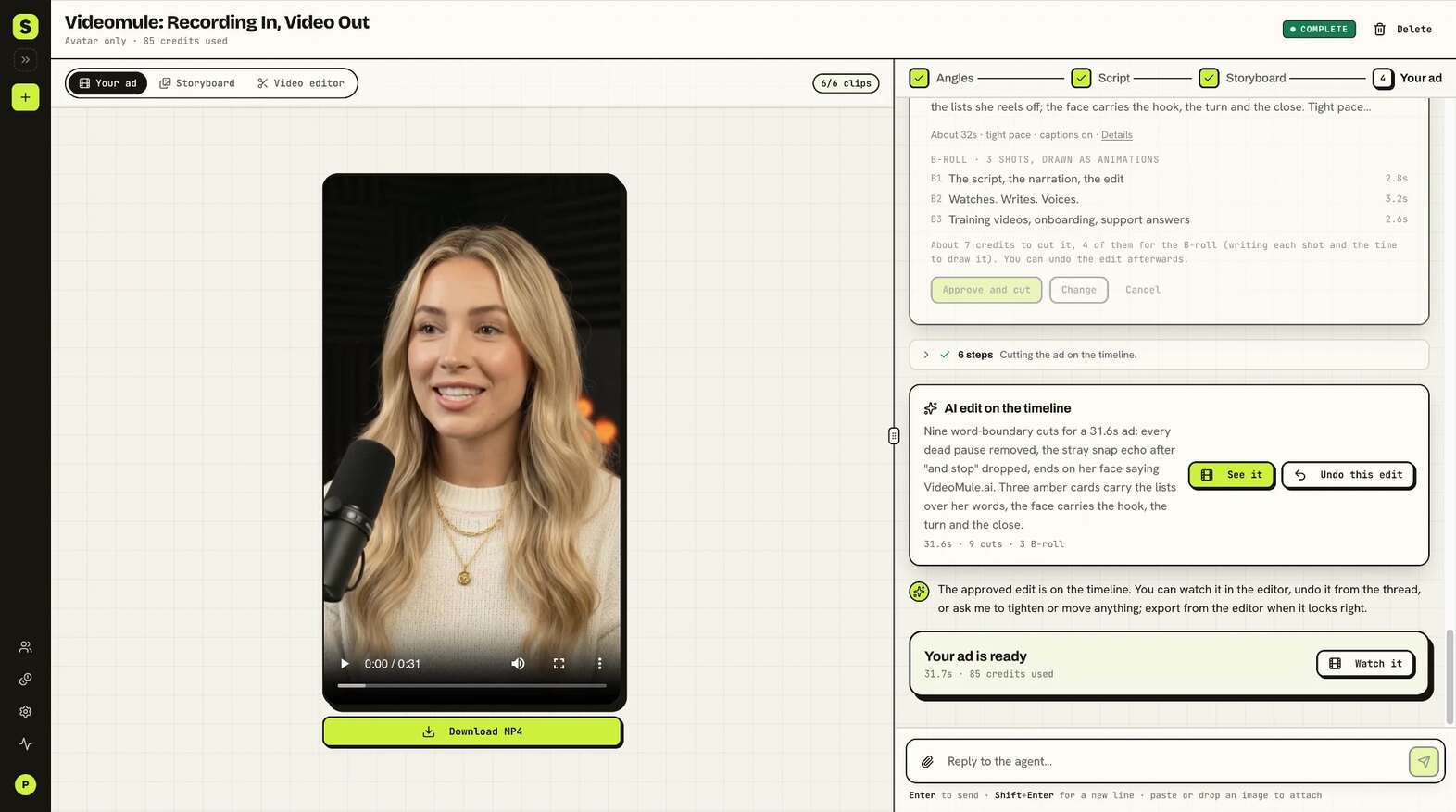
Start with what you're selling
Choose an avatar and ad format. Describe your product, who it's for and the tone you want. You can also start from your product website, or paste a script you've already written.
Choose the message before generating the video
The AI agent proposes angles and recommends a direction. Choose one, ask for changes and review the script clip by clip. Check the product facts and wording before approving it.
Already have an approved script? Take it straight to the storyboard.
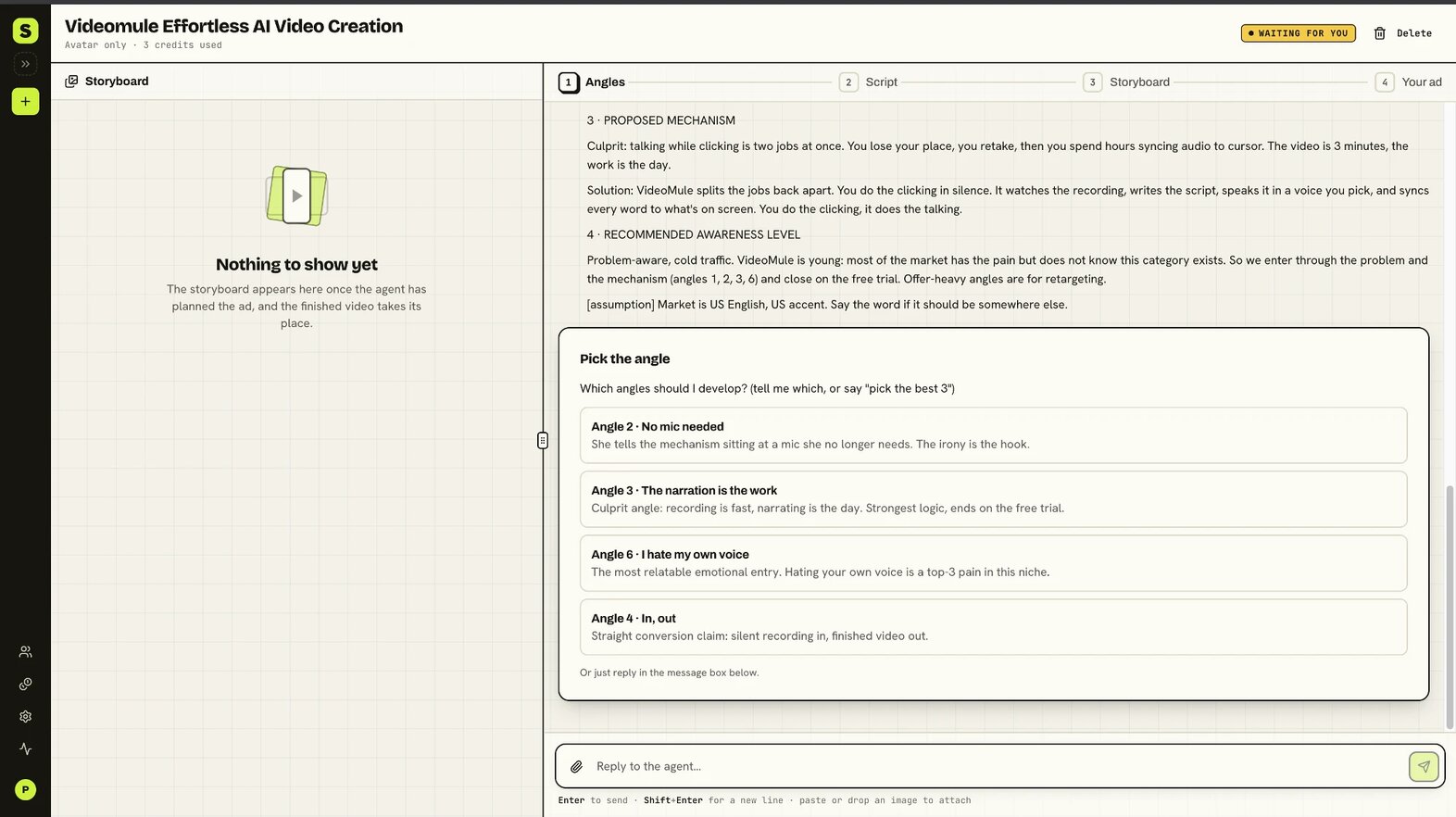
The storyboard, then every clip
The agent gives each clip a reference image, a spoken line and a shot direction, then starts all the clips as soon as the storyboard is ready. If your credits run short or a frame doesn't show your product, it stops and tells you what to do.
Want to check the storyboard first? Tick the review box when you start the ad.
Preview the clips and finish your ad
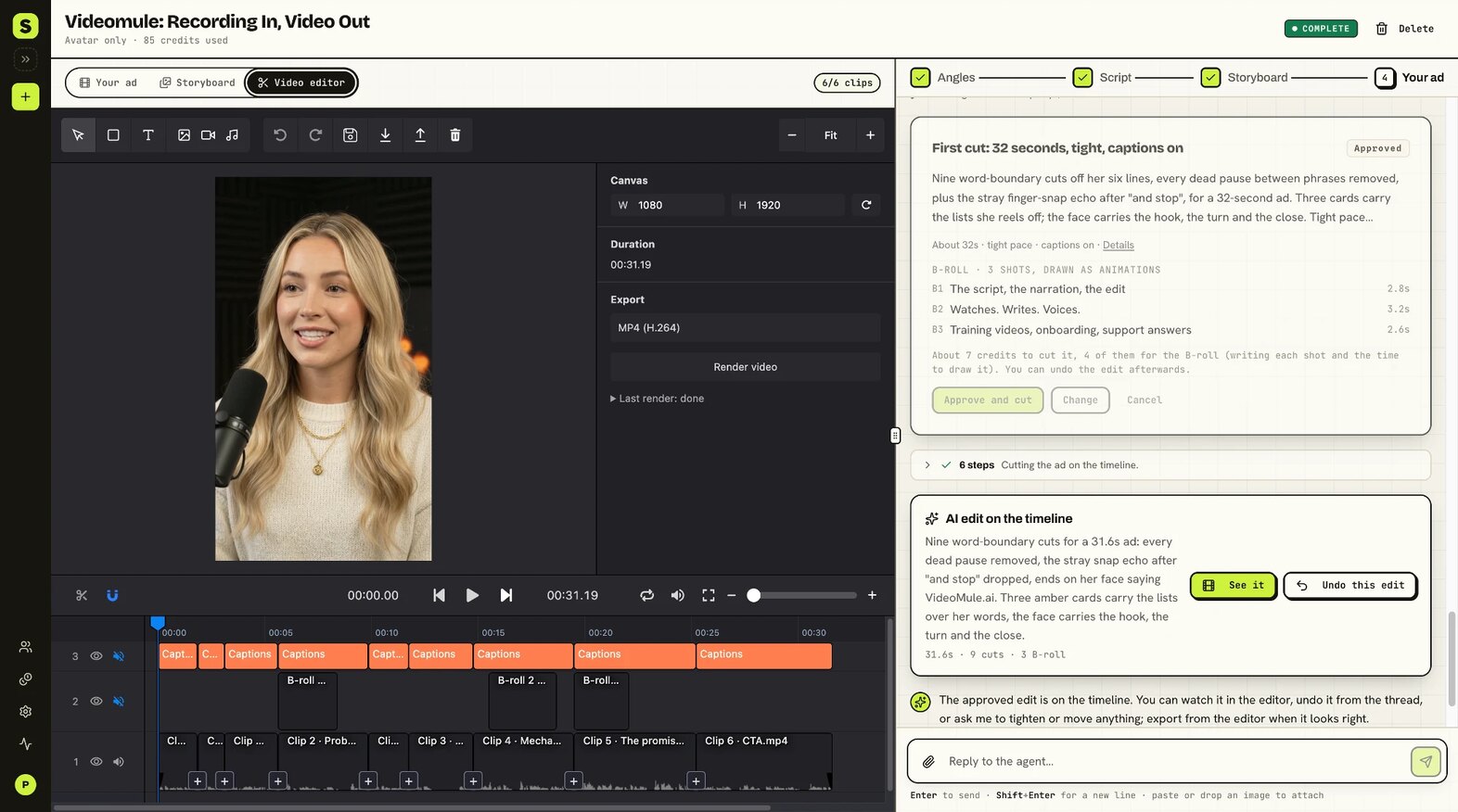
Watch each clip and redo the parts that need work. Then cut the clips into your ad in the video editor, or let Edit with AI make the first cut for you, and download the MP4.
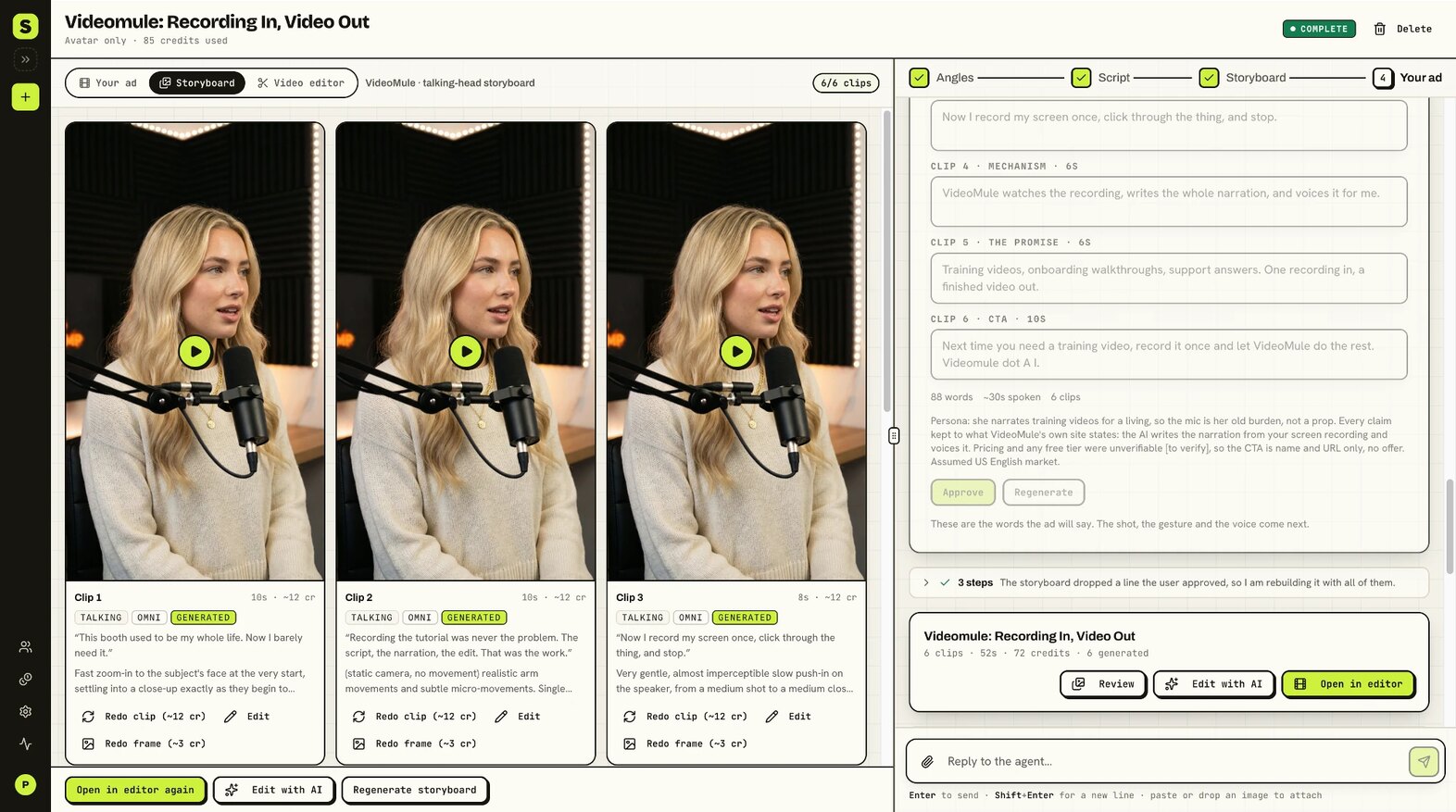
Change the opening.
Keep the other clips.
Say the product explanation is right, but the opening takes too long to get to the point. Open the first clip, rewrite its line and regenerate that clip. Preview the new take, then put the ad together again in the video editor with the other clips you've already generated.
You can also adjust camera direction and gestures. Direct the delivery in words, then watch the result to decide what to keep.
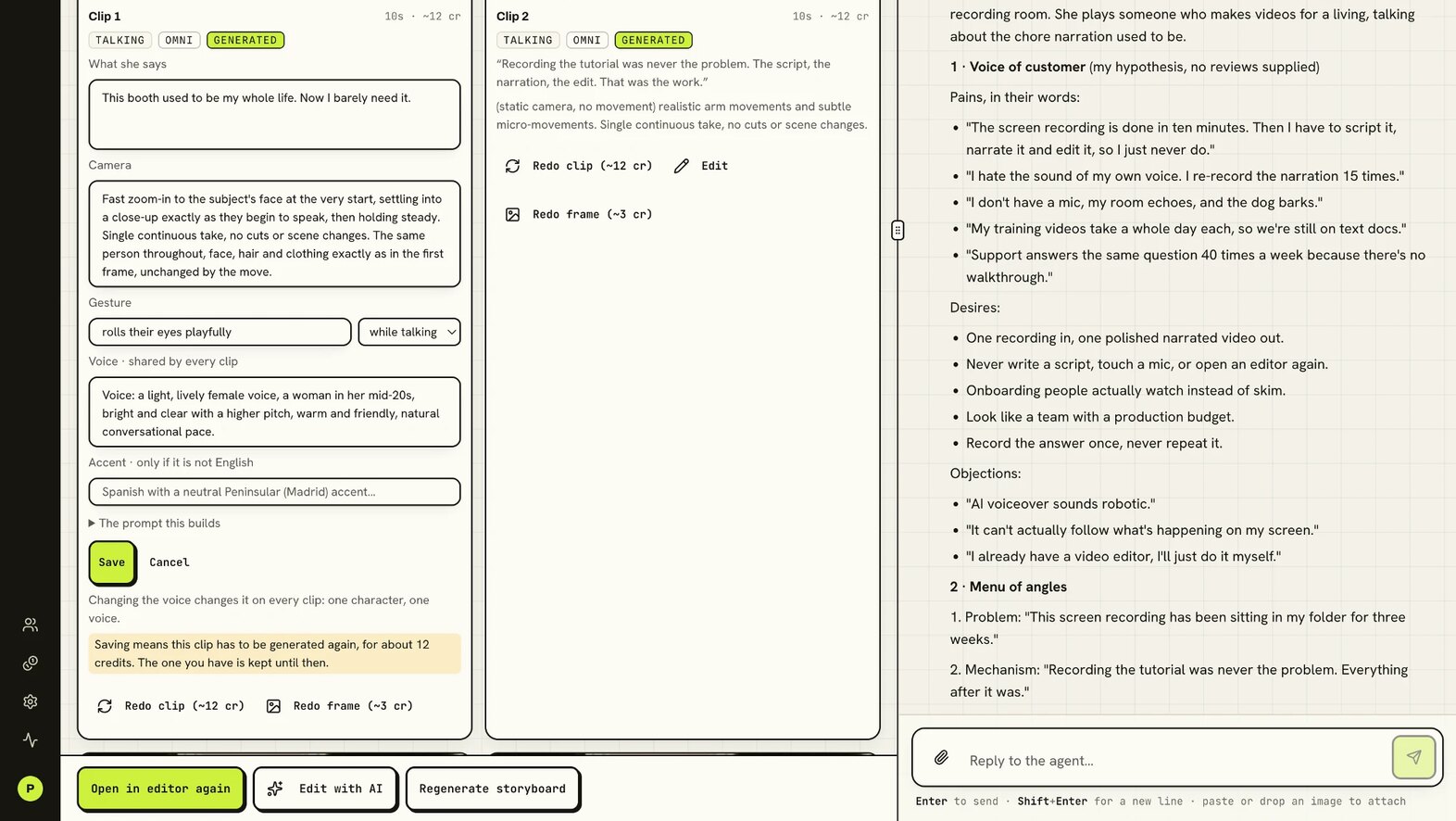
Redoing a clip costs what making it did, shown on its Redo clip button (about 12 credits for a talking clip at Standard), and can change other details within that clip. Check the new take before you use it in the ad.
Add visual context with generated cutaway stills. Ask the agent to move a still to another clip or change when it appears, reusing the image. Preview the finished ad to check the timing.
Make my free AI adFinish it in the video editor.
Your generated clips open on a timeline in storyboard order, with each clip's audio drawn underneath, so you can trim a take to exactly where the sentence ends.
Split and rearrange clips, add transitions and animations, and put your own text, images, video or music on top. Crop and resize, change speed and volume, and fade sound and picture in or out.
Changes save as you go. Render the MP4 in your browser and it becomes your ad. Editing and rendering don't use credits.
The editor works on a computer, once your ad has at least one generated clip.
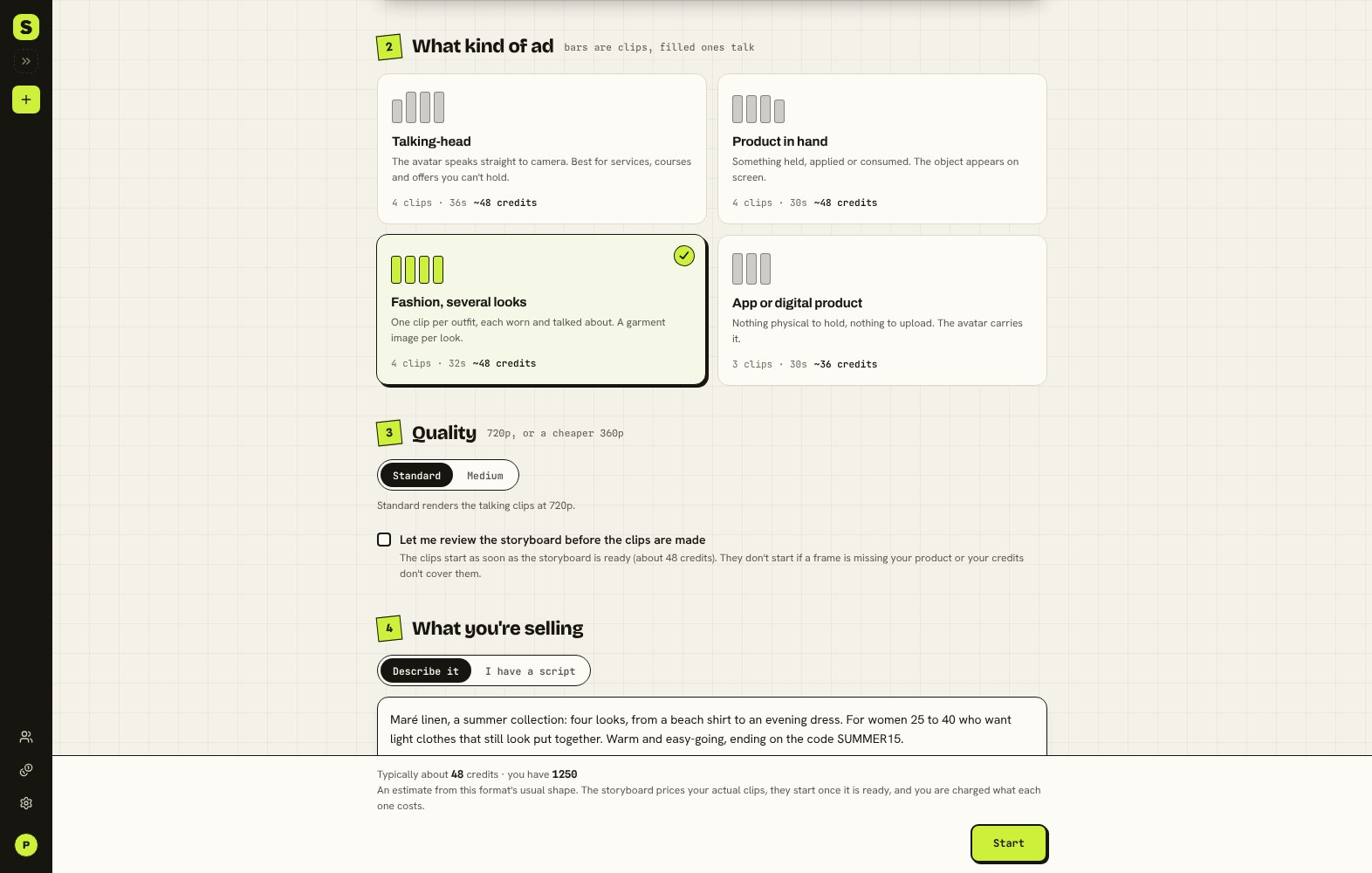
Start with the format your offer needs.
For services, courses and offers you can't hold, choose Talking-head. For software or another digital offer, choose App or digital product. Both let the avatar carry the message without a product upload.
With Product in hand, turn a product photo into an avatar-led product presentation.
Show several looks on one AI presenter with Fashion, several looks. Upload a garment image for each look, up to four, and build an ad with a separate clip for each outfit.
Review product labels, garment details and movement in the generated clips.
Create an avatar from a reference photo or reuse one you've saved. You can develop a talking-head concept without presenting it on camera yourself.
Pricing
Start with a free ad. Choose a paid plan when you're ready to make more.
Every plan adds credits each month: Starter 800, Growth 2,100, Pro 4,500. A talking clip at Standard (720p) uses about 12, and its reference frame about 3. An ad takes three or four clips, and redoing a clip costs what making it did.
International· Prices below are in US dollars.
Starter
$19/month
Monthly billing
- Or pay yearly
- $190/year
- Works out to about
- $15.83/month
Included each month
- 800 credits a month
- About 50 talking clips, at Standard (720p)
- Or about 8 ad creatives
- 10 GB of storage, ads kept while you're subscribed
Growth
$49/month
Monthly billing
- Or pay yearly
- $490/year
- Works out to about
- $40.83/month
Included each month
- 2,100 credits a month
- About 135 talking clips, at Standard (720p)
- Or about 21 ad creatives
- 25 GB of storage, ads kept while you're subscribed
Pro
$99/month
Monthly billing
- Or pay yearly
- $990/year
- Works out to
- $82.50/month
Included each month
- 4,500 credits a month
- About 290 talking clips, at Standard (720p)
- Or about 45 ad creatives
- 50 GB of storage, ads kept while you're subscribed
Pay yearly and you get 12 months for the price of 10, about 17% less than paying monthly. The yearly price is charged in one payment.
FAQs
- What quality is the video?
- You choose when you create each ad. Standard renders the talking clips at 720p; Medium renders them at 360p for about a third of the cost, with the same script and lip-sync. Your free ad is made at Medium. You can preview the clips and download the finished MP4. Evaluate the complete video with sound before deciding how to use it.
- Can I use the download in a paid campaign?
- Treat the current output as a concept preview. Before publishing, check the export against your intended placement's requirements and your brand's quality standard. You may need additional editing or finishing.
- What if the script doesn't sound like us?
- Give the agent feedback on the angle, wording or tone before approving the script. You can also supply your own script from the start. Review product claims yourself, especially when starting from a website.
- Does UGC-style mean a real customer made it?
- No. The presenter is an AI avatar. “UGC-style” describes the presentation, and does not establish a real customer's experience with your product.
- What does the free trial include?
- You get one avatar image and one complete ad, with no card required: the planning, the reference frames and every clip of its storyboard, each made once. Redoing a clip or making a second ad needs a plan or a credit pack.
- Will I need to regenerate the entire ad to fix one clip?
- You can regenerate a selected clip and put the ad together again in the video editor with the other existing clips. Check the new take before using it. Voice settings are shared, so a voice change applies across the ad.
- Can I edit the video myself?
- Yes. On a computer, open the Video editor tab on any ad with generated clips. Trim, split and rearrange the clips, add transitions and your own text, images or music, then render the MP4 in your browser. Editing and rendering don't use credits.
Start with the product
you want to sell.
Bring your product brief or an approved script. Make your first AI ad free, review the delivery and decide what to develop next.
Make my free AI adFree trial: 1 avatar image + 1 complete ad. No card required.